Tuesday, 6 March 2018

Friday, 2 March 2018
Research into tour locations
As we are trying to promote an up and coming synthetic artist, it was vital that we knew who our target audience were so that our artist can tour the country to play for his fans. Tyson Tyson's target audience is young girls aged between 14-25 who enjoy listening to dance music. As Tyson Tyson is a British DJ who has not yet gained an international fanbase, we needed to focus his tour around small, intimate venues across the UK.


The Venues:
As Tyson Tyson's marketing team, we aimed to gain a crowd capacity of between 500 and 1000 fans per venue. We had to make sure that the venue's we were choosing weren't too big for an up and coming artist, as we knew we had a small budget compared to international artists. We also didn't want to create the impression that our artist wasn't capable of selling out gigs from the extra space that large venue's provide, so therefore we aimed for small venue's so that our artist's tour would be able to sell out. As Tyson Tyson is a DJ and his music is of the dance/ pop genre, we also aimed to book large nightclubs as some of our tour venues to correspond with the genre of our artist's music and his star image.

The Roundhouse - London

O2 Academy - Leeds

Roadmender - Northampton
The Locations:
Whilst researching tour venues we also needed to focus on the geographical locations of the venue's to make it seem realistic of how our artist would get from A to B in the space of 24 hours or less. Tyson Tyson's first tour date starts on Saturday 10th March at the Theatre Royal in Plymouth and ends on Friday 13th April at the Grand Opera House in Belfast, consisting of a total of 22 tour dates in just over a month. From researching these venues and the distance between different cities we have distributed the tour dates in chunks over the month, allowing time for our artist to relax between playing in different cities and allowing time for the tour bus to travel the country. The tour will start in the South of England before heading over to the West and Wales, and then progressing North up the country and to Scotland before finally ending in Northern Ireland. The distribution of our tour dates therefore makes it possible for our artist to travel the country in time for each concert.
Below is a list of our tour dates:

Test shots for digipak
We took several different pictures of our artist to use on our digipak. We took a variety of shots from different angles and with our artist posing differently in order to find an image that best connotes his star image so that we could use it for our digipak. We needed to consider if the image would attract the members of our target audience and if it fitted in with the conventions of other pop artists.
Below are some of the shots that we took of our artist Tyson Tyson:
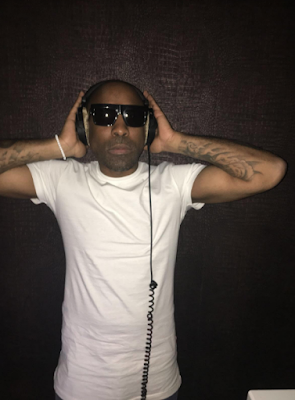


Below are some of the shots that we took of our artist Tyson Tyson:


Thursday, 1 March 2018
Feedback on our digipak
The feedback we received from our target audience regarding our digipak was mainly positive, as our audience commented on how they liked the colour contrast of the red and black as they thought it stood out and that the design highlighted the pop/dance genre of our artist's music, which is what we intended. They also commented on the picture of our artist from the inside cover, and how they thought this picture really illustrated the synthetic nature of our artist and emphasised his DJ status. Our audience also thought that we demonstrated continuity throughout our digipak by using the same colours.
However, we received one criticism of our digipak which was that the writing on the front cover was not directly in the centre of the cover, which our audience found annoying to look at.
Overall we are very happy with the feedback we received on our digipak as it demonstrates how we have successfully created a product that appeals to our target audience and illustrates the synthetic star image of our artist.
The editing process so far
We used a programme called Premier Pro in order to help edit our music video by adding special effects and putting the clips together on a timeline. We had to put all our clips onto a USB stick which we converted from an SD card. Once all the clips were uploaded to one of our computer’s we were able to drag them onto premier pro and begin to edit them.
 The editing firstly involved cutting some of the clips down as they were shot for too long. Once we did this we had to make sure they were put in the correct order on our timeline. This took a while as we had to work through each clip double checking the narrative made sense. After a few hours the clips all fitted together.
We then had to add the music in the background. We made sure the song didn't have any copyright and dragged it into Premiere Pro. We inserted it behind the clips and played our video. As we watched the video we had to make sure the song fitted to each clip. This became complicated as we saw some clips wouldn’t fit properly with the song so we had to move some of the clips around. But we eventually fixed it all and it looked really good.
In order to make our video look even better we added special effects from a programme called after effects. We used colour correcting to make more of an 80s feel to our music video and other effects such as fast and slow motion.
After this process we will show our class to see what needs to be improved for next time to make it even better.
 The editing firstly involved cutting some of the clips down as they were shot for too long. Once we did this we had to make sure they were put in the correct order on our timeline. This took a while as we had to work through each clip double checking the narrative made sense. After a few hours the clips all fitted together.
 We then had to add the music in the background. We made sure the song didn't have any copyright and dragged it into Premiere Pro. We inserted it behind the clips and played our video. As we watched the video we had to make sure the song fitted to each clip. This became complicated as we saw some clips wouldn’t fit properly with the song so we had to move some of the clips around. But we eventually fixed it all and it looked really good.
In order to make our video look even better we added special effects from a programme called after effects. We used colour correcting to make more of an 80s feel to our music video and other effects such as fast and slow motion.
After this process we will show our class to see what needs to be improved for next time to make it even better.
Tuesday, 27 February 2018
Mood board of locations
We created a mood board of the locations we were using on our shoot day in order to demonstrate a general idea of the setting of our music video.
Below is the mood board that we created:

Below is the mood board that we created:

Subscribe to:
Posts (Atom)